


Overview
Encountering the dreaded “No space left on device” error during production server operations demands immediate, systematic investigation, and the df utility serves as your primary line of defense. This walkthrough breaks down practical usage patterns for systems engineers—from rendering readable storage metrics and stripping noisy virtual mount points to diagnosing deceptive “phantom full” issues caused by depleted inodes. We will also dive into operational caveats, particularly explaining why your df output might stubbornly disagree with directory-level du scans after file deletions.
1. Inspecting Storage Volumes with Human-Readable Units (df -h)
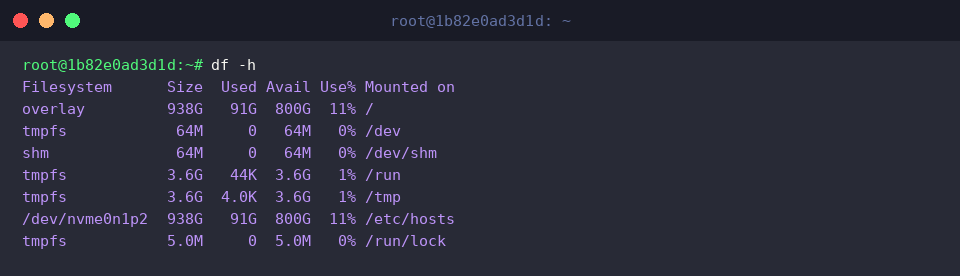
The df (disk free) utility interrogates all mounted file systems across the OS, reporting real-time allocation and available storage reserves.
When executed without arguments, it defaults to raw 1-kilobyte blocks (1K-blocks). This granular output forces administrators to perform mental arithmetic just to evaluate partition capacities.
⚙️ [Essential Flags]
-h : Scales storage metrics dynamically into familiar, legible multiples (K, M, G).-T : Appends the underlying filesystem architecture (e.g., ext4, xfs, overlay) to each mount entry.-i : Switches focus from storage volume blocks to inode consumption, detailing file allocation headroom.-t : Constrains output exclusively to volumes matching a chosen filesystem format.-x : Omits specified filesystem families from the report.
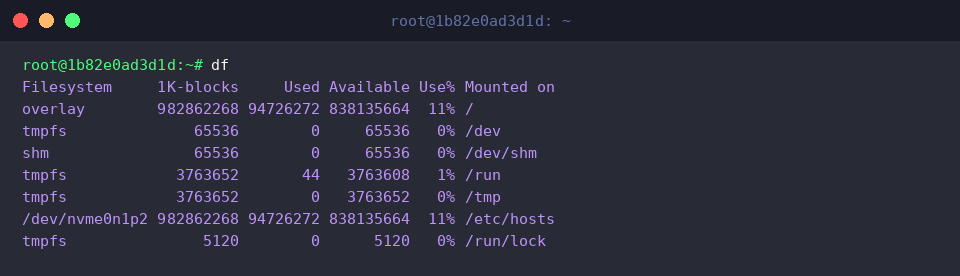
Invoking df -h enables the --human-readable mode, which automatically formats block counts into intuitive units like Megabytes (M) and Gigabytes (G).
This visual translation allows system operators to immediately spot storage bottlenecks across drive arrays without parsing unwieldy multi-digit numbers.
2. Filtering Virtual Filesystems and Isolating Key Partitions (df -h -x / -t)
By running df -h -x tmpfs -x devtmpfs -x squashfs, administrators leverage multiple -x (--exclude-type) declarations to strip clutter out of the report.
On modern Ubuntu hosts, virtual allocations such as memory-backed filesystems (tmpfs, devtmpfs) and loop-mounted Snap packages (squashfs) pollute terminal output.
Suppressing these ephemeral and read-only targets cuts through the noise, surfacing only real physical storage pools and primary host mounts.

Conversely, passing df -h -t ext4 utilizes the -t (--type) filter to single out dedicated filesystem architectures.
Targeting Linux standard formats like ext4 strips all auxiliary mounts, letting engineers verify the health, percentage usage, and available gigabytes of their main operating volumes at a glance.

3. Resolving Creation Failures with Abundant Free Space: Inode Depletion (df -i)
To simulate and diagnose index exhaustion scenarios, we establish an isolated test environment and populate it with a cluster of sample files.

Targeting our test path via df -i /tmp/df-test inspects index node (inode) saturation on the backing volume.
Every filesystem reserves a finite pool of inodes during initialization. Even if hundreds of gigabytes remain unallocated, an exhausted inode table (IUse% 100%) will cause the kernel to throw write errors and reject new file creation.
The generated table itemizes Inodes (total allocated metadata slots), IUsed (active records), and IFree (available slots), allowing you to pinpoint whether sheer file count has paralyzed disk operations.

Once verification concludes, running rm -rf /tmp/df-test removes the mock hierarchy and cleans up test artifacts.

4. Production Caveats: Ghost Allocations and Discrepancies Between df and du
To inspect locks on unlinked resources, we first verify that the system has lsof (list open files) ready in its path, installing it via the package manager if missing.

Executing lsof +L1 uncovers active process handles referencing unlinked files whose link count has dropped below 1 (zero links remaining).
A notorious operational pitfall occurs when an administrator deletes an active application or log file with rm. If an ongoing daemon or background worker keeps that descriptor open, the kernel defers reclaiming the underlying disk blocks. While du will no longer account for the path, df continues to report the volume as fully occupied.
Locating the process ID (PID) from the lsof output and either reloading, signaling, or terminating the offending process closes the descriptor, instantly restoring your free disk blocks in df.

Equipped with these five foundational df switches and an understanding of file descriptor locking mechanisms, you are well-prepared to diagnose complex disk saturation incidents across Linux environments.
Integrating these inspection patterns into your administration workflow guarantees faster incident triage and resilient server uptime.