


Overview
Whenever server workloads spike or sluggish behavior strikes in an Ubuntu or Linux environment, systems engineers almost universally reach for the free command as their frontline diagnostic utility. Rather than just skimming surface numbers, this guide delves into unit-scaling flags, dissects the crucial distinction between raw free and truly available memory, clarifies what page buffers and caches actually represent, and demonstrates real-time polling during active stress workloads.
1. Fundamentals of Memory Inspection and Human-Readable Display Switches (-h, -m, -g)
At its foundation, free extracts high-level memory metrics directly from the kernel, giving administrators a consolidated snapshot of installed physical RAM and allocated swap storage across total capacity, active allocations, and unreserved blocks.
Executing the utility without trailing arguments outputs raw values denominated strictly in kibibytes (KiB), which often complicates rapid mental calculations on servers equipped with dozens of gigabytes.
⚙️ [Core Command-Line Options]
-b : Expresses all memory telemetry strictly in raw bytes.-k : Forces the output into kibibytes (KiB), representing standard default behavior.-m : Standardizes the display into mebibytes (MiB).-g : Scales all measurements into gibibytes (GiB).--mega : Calculates statistics using base-10 decimal units (1 MB = 1,000,000 bytes) rather than binary equivalents.--giga : Scales statistics via decimal gigabytes (1 GB = 1,000,000,000 bytes).-h : Dynamically chooses human-readable binary prefixes (B, Ki, Mi, Gi, Ti) tailored to value size for immediate legibility.-w : Engages wide mode to decouple kernel file buffers and page caches into distinct columns.-c [count] : Loops command execution for a predetermined number of iterations before exiting.-s [seconds] : Continuously refreshes the telemetry stream by sampling at specified interval delays.-t : Appends an aggregate summary record combining physical memory and swap metrics.

Invoking free -h triggers dynamic scaling where each metric receives an appropriate human-friendly prefix such as GiB, MiB, or KiB.
Because it eliminates mental arithmetic while troubleshooting operational incidents, this flag combination remains the standard daily choice for system operators.

Executing free -m normalizes every reporting metric directly into whole mebibytes (MiB).
By stripping away alphanumeric unit suffixes and aligning clean numeric values, this format is exceptionally well suited for parsing routines in automation scripts or establishing reliable baseline thresholds.

2. Dissecting Output Columns: Distinguishing Free vs. Available and Isolating Buffers from Cache
Deploying free -h formats the terminal with multiple descriptive headings, yet interpreting them requires understanding how the Linux memory manager operates under the hood.
The free column reflects strictly pristine, unmapped RAM that holds zero data.
In sharp contrast, the available metric provides an intelligent estimate of how much memory can immediately be handed over to new or expanding processes without forcing the host to swap, calculated by factoring in reclaimable page caches and slab objects.
Consequently, modern Linux capacity planning and health checks should always gauge headroom against available, never free.

Supplying wide mode via free -h -w cleanly disentangles the combined buff/cache aggregate into dedicated buffers and cache fields.
The buffers statistic captures temporary storage utilized by the kernel to stage raw disk block transfers and hold filesystem metadata.
Meanwhile, the cache entry accounts for the page cache, which keeps recently accessed file contents in RAM to accelerate read operations.
Because the kernel will immediately evict these cached pages whenever executing processes demand space, both pools act as an elastic performance buffer rather than locked memory.

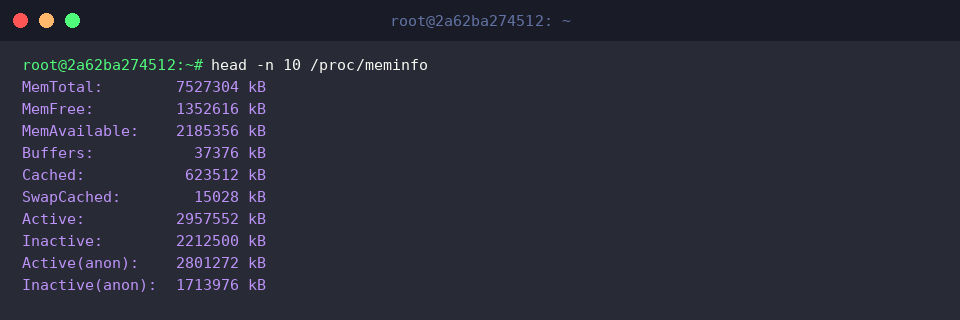
Querying head -n 10 /proc/meminfo reveals the raw kernel data stream that underpins userland monitoring tools.
Virtually every metric surfaced by free—including MemTotal, MemFree, MemAvailable, Buffers, and Cached—derives directly from mathematical transformations of this virtual filesystem node.
Querying /proc/meminfo is an invaluable sanity check when verifying metric precision or scripting tailored health instrumentation.
3. Live Resource Tracking and Aggregated Totals via -s, -c, and -t
Appending the summary flag via free -h -t introduces a final Total row that merges physical RAM (Mem) and secondary paging space (Swap).
This unified row offers an instant macroscopic perspective of overall system capacity, making it easy to determine total resource consumption across all memory tiers at a glance.

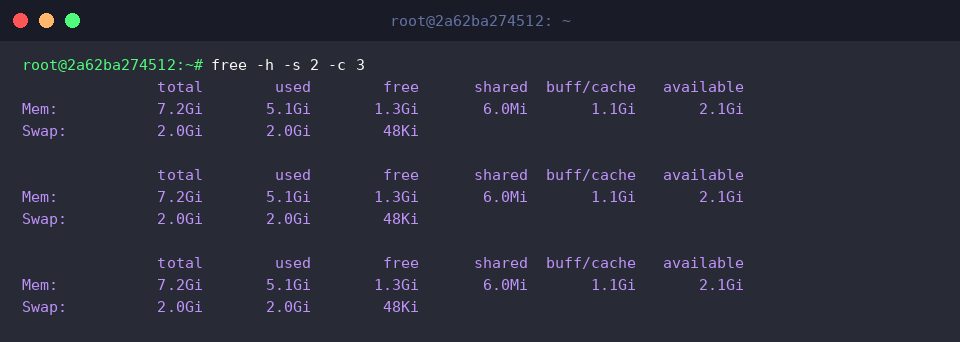
Running free -h -s 2 -c 3 instructs the tool to sample memory consumption every two seconds (-s 2) across three successive cycles (-c 3).
This interval capability turns the utility into a lightweight, non-intrusive stream monitor for catching volatile spikes caused by background cron jobs or application bootstrap sequences.
4. Simulating Workloads: Observing Dynamic RAM Allocation with Stress Testing
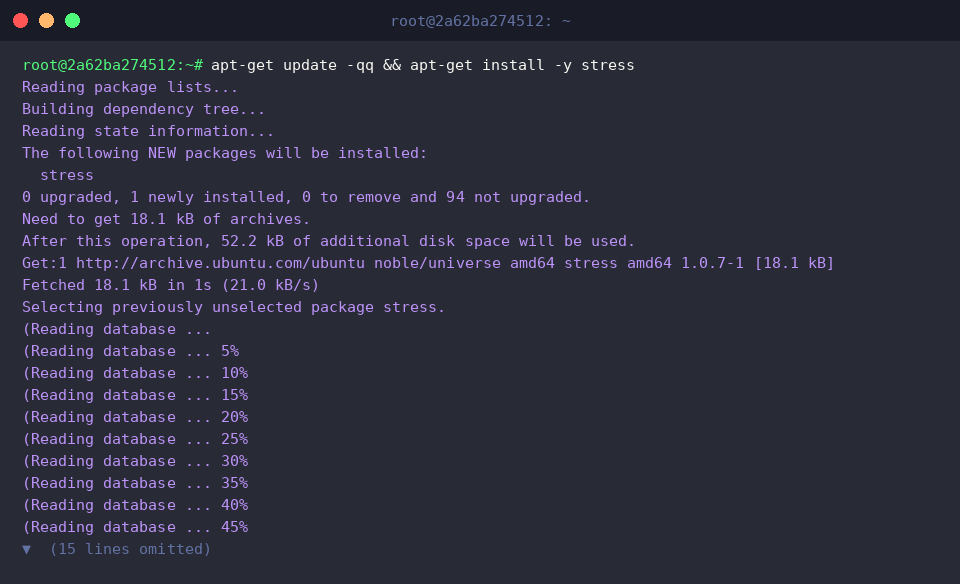
To demonstrate how these metrics fluctuate under active memory pressure, install the synthetic load generator stress.
First, establish an initial baseline across the system by running free -h.
In this baseline state, used sits at 5.2GiB, completely unallocated free memory registers at 1.2GiB, and practical headroom within available stands at 2.0GiB, indicating healthy operating capacity.

Next, run stress --vm 1 --vm-bytes 256M --timeout 5s to spin up a single virtual memory worker that allocates and touches 256MB of RAM for a five-second window before relinquishing the resources.
This deliberate allocation allows us to trace real-time memory shifts under predictable conditions.

Checking the memory footprint right after executing the workload highlights immediate resource shifts.
Comparing the telemetry against our pre-test baseline reveals that used climbed from 5.2GiB to 5.3GiB, while unallocated free dropped from 1.2GiB down to 1.0GiB and available slipped from 2.0GiB to 1.9GiB—proving that the kernel swiftly satisfied the transient memory request from active RAM.

Understanding the nuances of the free command transforms an ordinary terminal check into a powerful diagnostic methodology.
By keeping an eye on the available column rather than getting alarmed by low free counts, and by isolating buffers from page caches, administrators can make confident, accurate capacity decisions in any Linux production environment.