


Overview
Managing package states across Ubuntu and Debian-based systems often requires visibility into underlying package manager behavior. The apt-config utility serves as an indispensable administrative tool for auditing and troubleshooting these configurations. This walkthrough demonstrates how to inspect the complete directive tree, extract system parameters directly into automation scripts, and safely validate custom configuration snippets prior to deployment.
Inspecting Global APT Directives and Hierarchy (apt-config dump)
Executing apt-config --version outputs the installed APT binary release alongside the default host architecture detected by the system.
⚙️ [Core Options]
dump : Traverses and outputs the full cascade of active APT parameters in hierarchical format.shell : Formats queried directives into shell-compatible assignments suitable for automated scripts.-c, --config-file : Instructs the parser to evaluate an explicit configuration file instead of standard paths.-o, --option : Injects or overrides specific configuration directives directly from the command line.-v, --version : Prints the current version identifier of the APT utility suite.-h, --help : Displays standard syntax instructions and operational flags.

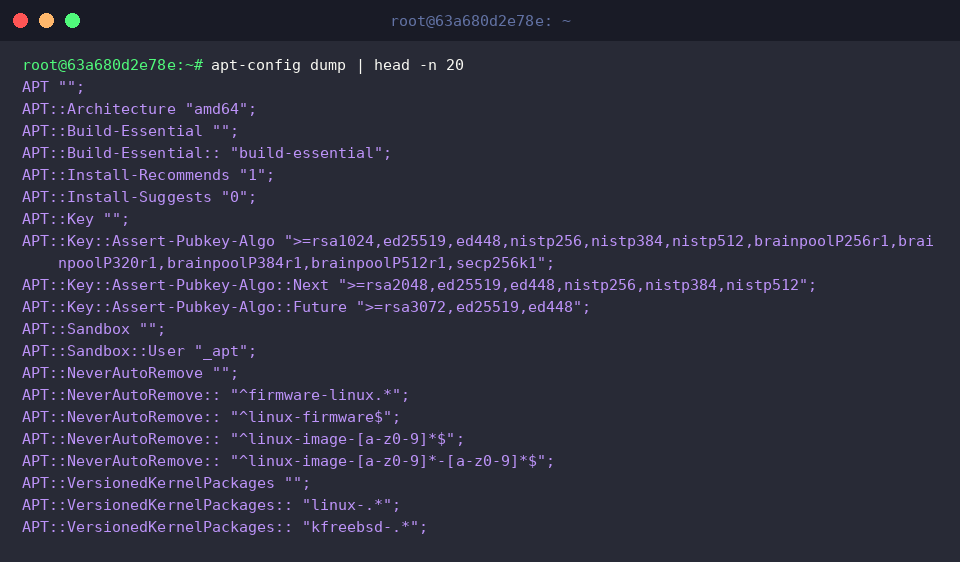
Running apt-config dump | head -n 20 surfaces the leading twenty records from the parsed directive tree, giving administrators immediate insight into default organizational keys and scoping rules.
Pinpointing Essential Storage Paths and System Architectures
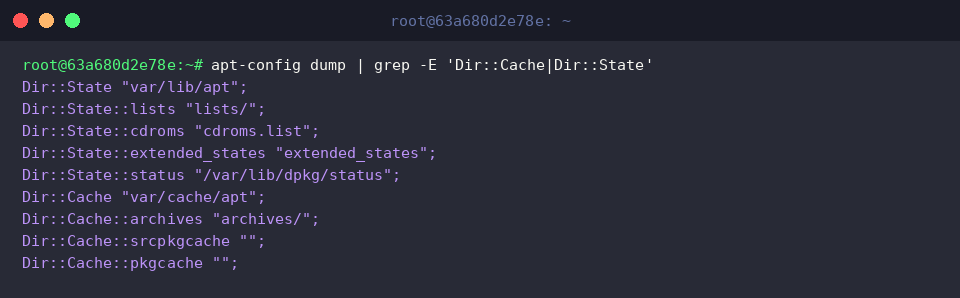
The command apt-config dump | grep -E 'Dir::Cache|Dir::State' isolates file path directives governing package caching locations and internal state databases.
System operators frequently rely on this targeted query when performing filesystem capacity audits or relocating package repositories to alternate storage volumes.
Executing apt-config dump | grep -i 'APT::Architecture' confirms the CPU architectures recognized by the package resolution engine.
This step provides positive verification that the operating environment correctly targets amd64 binaries during dependency evaluation.

Exporting Settings Directly into Shell Variables (apt-config shell)
Using eval $(apt-config shell APT_ARCH APT::Architecture CACHE_DIR Dir::Cache/d) queries multiple parameters in a single invocation and injects them directly into the calling shell session.
Appending the /d modifier instructs the tool to return directory structures normalized with a terminating slash (/), preventing malformed path concatenations downstream.

Invoking echo "아키텍처: ${APT_ARCH}, 캐시 디렉터리: ${CACHE_DIR}" validates that the shell variables properly inherited their values from the configuration store.
Automated provisioning routines and maintenance scripts can immediately consume these initialized variables without additional string manipulation.

Staging and Validating Custom Configuration Blocks
Running mkdir -p /tmp/apt-test && echo 'Acquire::http::Timeout "60";' > /tmp/apt-test/custom.conf provisions an isolated testing workspace and generates an experimental configuration stanza defining an HTTP connection threshold of 60 seconds.

The command apt-config -c /tmp/apt-test/custom.conf dump | grep 'Acquire::http::Timeout' forces the configuration engine to parse the candidate file via the -c parameter, auditing its syntax before runtime adoption.
The presence of Acquire::http::Timeout "60"; in the returned output confirms the rule was successfully parsed into the live directive tree.

Once testing concludes, clean up all temporary artifacts and directories created during the exercise by executing rm -rf /tmp/apt-test.

Gaining proficiency with apt-config provides systems administrators with granular visibility into Debian and Ubuntu package management internals. Leveraging these commands simplifies troubleshooting complex multi-file configuration cascades and ensures dependable automation throughout your deployment pipelines.