


Overview
Identifying machine architecture is an essential prerequisite before deploying custom binaries or pulling software packages in Linux environments. Rather than plowing through dense manual pages, this tutorial provides a straightforward, terminal-centric walkthrough on how to inspect your host processor architecture using the arch utility alongside complementary system inspection tools.
Inspecting Hardware Machine Architecture Using the arch Command
The arch utility serves as a quick mechanism to determine the underlying hardware machine name and processor architecture of your operating system.
In the terminal output below, the system returns x86_64, confirming an Intel or AMD 64-bit architecture.
⚙️ [Core Options]
--help : Displays a command synopsis along with supported arguments before exiting.--version : Prints tool release information, licensing terms, and exits.

Alternatively, invoking uname with the -m machine flag queries the same lower-level kernel subsystem, returning identical processor nomenclature.
As expected, running uname -m yields x86_64, demonstrating that both utilities tap into the exact same hardware metadata internally.

Identifying Architecture from a Package Management Perspective (dpkg)
Debian-based package handlers like dpkg and APT rely on distinct naming conventions compared to standard kernel hardware strings. Executing dpkg --print-architecture reveals the primary binary packaging target configured on your system.
Notice that while arch reports the machine type as x86_64, the package ecosystem classifies this 64-bit platform as amd64.

To discover whether your workstation or server allows multiarch installations, run dpkg --print-foreign-architectures. This reports any supplementary secondary architectures authorized for package resolution.
An empty return value indicates that no alternate architectures (such as legacy 32-bit i386 packages) have been configured alongside the primary amd64 base.

Analyzing Detailed CPU Modes and Properties with lscpu
The lscpu command provides comprehensive processor architecture diagnostics. Ensure the host has the latest util-linux suite provisioned by refreshing package repositories and installing the package.
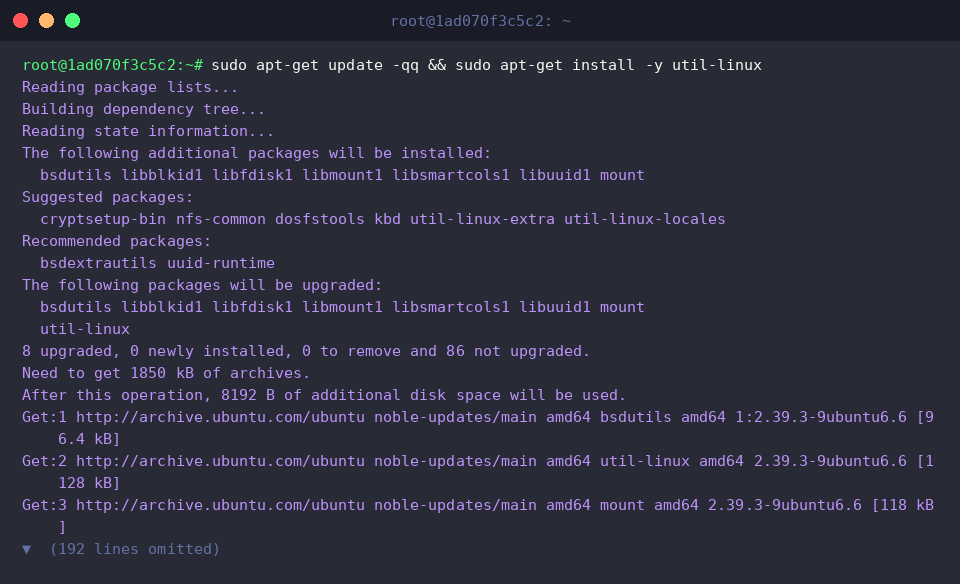
Piping lscpu into grep -E allows us to isolate essential processor specifications—specifically the architecture name, execution modes, and memory endianness.
The parsed output reaffirms an x86_64 CPU with dual-mode operational support (32-bit, 64-bit), meaning the processor maintains backward compatibility for legacy 32-bit software.
Furthermore, the byte order is explicitly designated as Little Endian, denoting that multi-byte integers are ordered starting with the least significant byte in memory.

Implementing Architecture-Aware Conditional Logic in Shell Scripts
In automated deployment scripts, dynamically detecting the CPU architecture is critical for selecting the correct binary payloads. You can generate a lightweight testing script using cat << 'EOF' > test_arch.sh.
Within this script, the evaluation assigns the output of arch to the variable ARCH and runs an if-elif-else evaluation block to branch between x86_64 and aarch64 platforms.
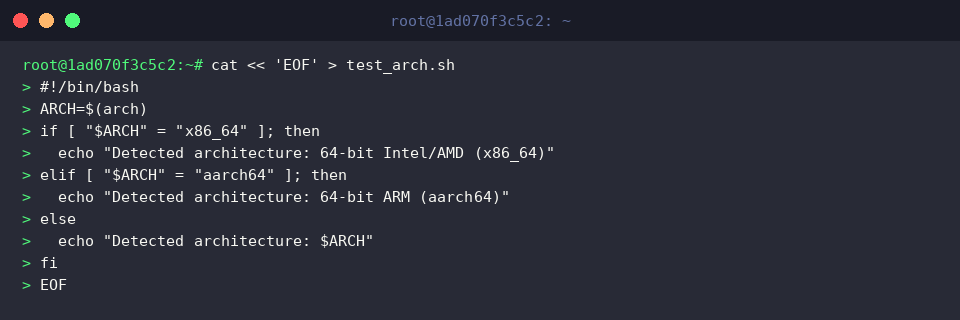
Before launching the newly created script, make the file executable by applying execution permissions with chmod +x test_arch.sh.

Execute the script via ./test_arch.sh to observe runtime branch resolution.
Because our operating environment matches the primary 64-bit x86 branch, the terminal promptly echoes Detected architecture: 64-bit Intel/AMD (x86_64).

Once verification is complete, clean up the workspace by purging the scratch script with rm -f test_arch.sh.

This walkthrough highlighted how the arch utility delivers instantaneous insight into Linux processor architectures.
Leverage these techniques whenever you need to validate target environments prior to installing toolchains or deploying multi-architecture infrastructure.