


Overview
Managing virtual switching fabrics in Linux requires robust diagnostic utilities, and the bridge tool from the modern iproute2 suite serves as the definitive administrative utility for layer-2 fabrics. This hands-on guide details how to stand up a test software bridge, audit member port links, examine MAC forwarding tables (FDB), and evaluate VLAN filtering configurations using clear command outputs.
1. Setting Up a Test Bridge and Inspecting Port Bindings (bridge link)
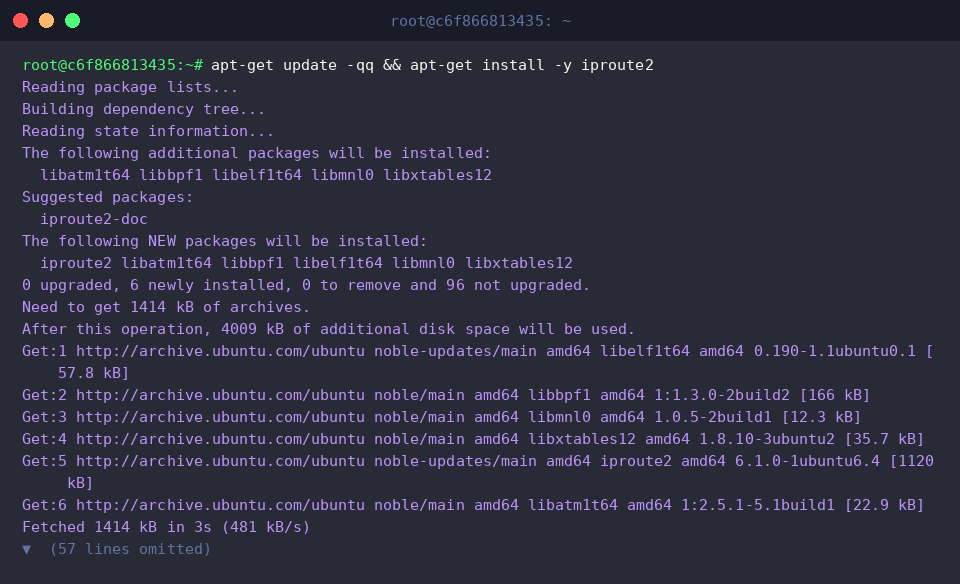
Before experimenting with software bridges, make sure the core networking suite is present on your Ubuntu host by installing iproute2.
Instantiate a virtual switch interface named br0 and elevate its link status by running ip link add br0 type bridge && ip link set br0 up.

Create an interconnected virtual Ethernet link pair (veth0 and veth1) to simulate connected network endpoints using ip link add veth0 type veth peer name veth1.

Attach the veth0 endpoint directly into br0 as a bridge slave port and bring it online with ip link set veth0 master br0 && ip link set veth0 up.

Executing bridge link show displays every interface connected to an active bridge along with its layer-2 attributes.
The terminal output reveals the parent switch device (master br0), Spanning Tree Protocol operational status (state disabled), port prioritization (priority), and designated STP path cost (cost).
⚙️ [Essential Flags]
-s (-stats) : Gathers comprehensive interface metrics, detailing transmitted/received packet counts, cumulative byte volumes, and dropped frame counters per port.-d (-details) : Reveals low-level STP state flags, internal timer values, and extended port parameters.-c (-color) : Applies terminal color formatting to enhance visual differentiation of output fields.-j (-json) : Emits diagnostic data in standard JSON format for automated scripting and API ingestion.-p (-pretty) : Pretty-prints JSON data with human-friendly indentation when combined with -j.

2. Inspecting and Manipulating the Forwarding Database (bridge fdb)
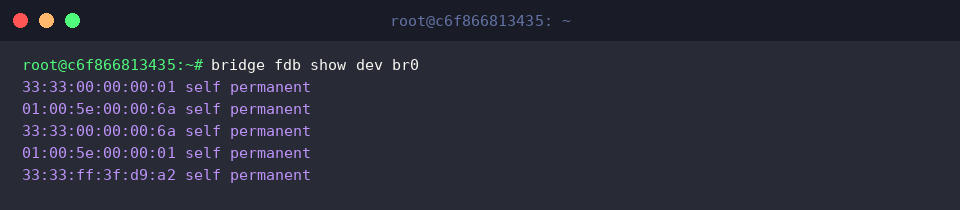
Running bridge fdb show dev br0 inspects the layer-2 Forwarding Database (FDB) entries registered directly to the bridge interface itself.
The output lists registered multicast MAC groups alongside kernel-managed hardware records marked with the self permanent flag.
To bind an explicit hardware address manually through the veth0 interface, run bridge fdb add 02:01:02:03:04:05 dev veth0 master static.
Specifying master commits the entry directly into the parent bridge switch database, while the static parameter prevents the kernel from pruning the record through routine MAC aging timers.

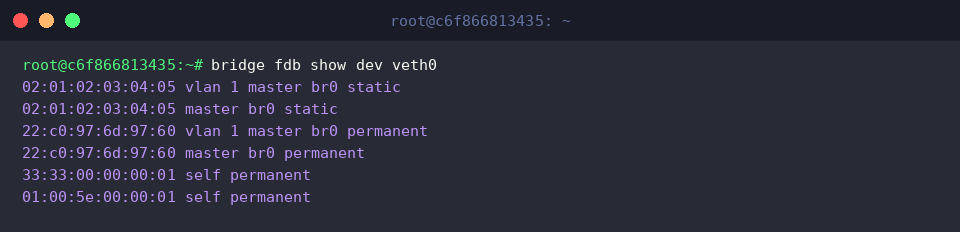
Executing bridge fdb show dev veth0 filters the forwarding table down to records associated specifically with veth0.
Both your manually defined static record (static) and the device’s native hardware entry (permanent) appear correctly mapped within the bridge domain (master br0).
3. Auditing Bridge VLAN Filtering and Port Memberships (bridge vlan)
Enable 802.1Q tag inspection on br0 by issuing ip link set dev br0 type bridge vlan_filtering 1.
Turning on VLAN filtering instructs the bridge engine to process frame tags and route Ethernet frames strictly according to authorized VLAN memberships.

Enroll veth0 into a new broadcast domain by executing bridge vlan add dev veth0 vid 10.
This operation assigns VLAN 10 membership to the port while keeping existing untagged default associations fully functional.

Inspect all active VLAN membership assignments across attached interfaces with bridge vlan show.
The resulting table illustrates the default native port assignment (1 PVID Egress Untagged) across both br0 and veth0, confirming that VLAN 10 is successfully attached to veth0 as a tagged member.

4. Querying Advanced Metrics (-s, -d) and Tearing Down Test Resources
Executing bridge -s link show pairs link state reports with in-depth packet traffic metrics, highlighting frame counters and byte throughput across ports.
The status report for veth0 displays real-time bridge properties including disabled STP mode (state disabled), port priority (priority 32), and link path weight (cost 2).

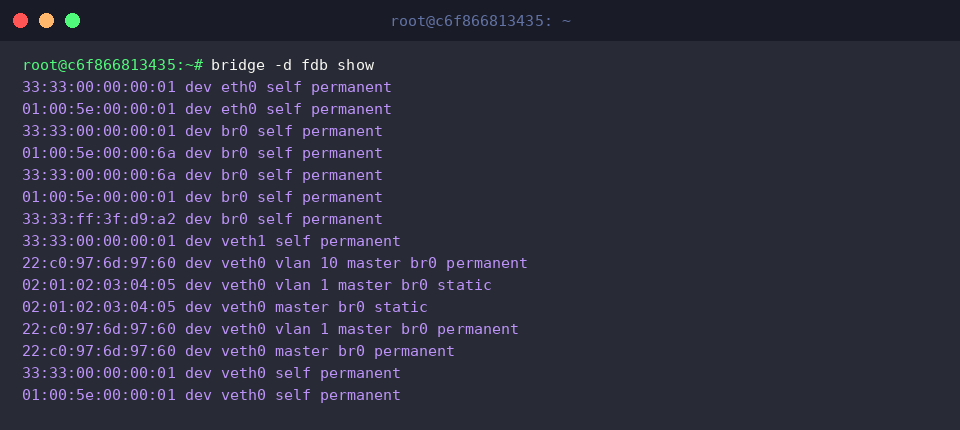
Run bridge -d fdb show to pull an expanded view of the forwarding database enriched with VLAN mappings and low-level kernel metadata.
Here, both the manual entry (static) and device addresses (permanent) correlate cleanly with their respective VLAN IDs (vlan 1, vlan 10) under the governing bridge instance (master br0).
Once testing is complete, detach the slave port and remove the ephemeral virtual network interfaces with ip link set veth0 nomaster && ip link delete br0 && ip link delete veth0.

This guide demonstrated how to leverage the Ubuntu bridge utility to inspect virtual interfaces, query MAC tables, and confirm VLAN isolation rules.
These diagnostic workflows form an essential foundation for troubleshooting Linux hypervisors, container bridges, and software-defined networks.