


Overview
Decompressing massive bzip2 archives merely to inspect routine operational logs wastes both disk space and I/O cycles on production Linux hosts. The bzgrep utility bypasses this overhead by evaluating regular expressions and strings straight against .bz2 archives on the fly. This walkthrough covers everything from provisioning a sandbox environment to executing case-insensitive lookups, locating exact line numbers, and sweeping patterns across multiple archives simultaneously.
1. Setting Up the Lab and Creating Sample bzip2 Archives
Begin by deploying the bzip2 package via apt-get update -qq && apt-get install -y bzip2 to ensure the required compression utilities and companion wrappers are available on your system.

Next, generate a realistic mockup of an application service log named server_access.log using the cat command with an embedded heredoc block.
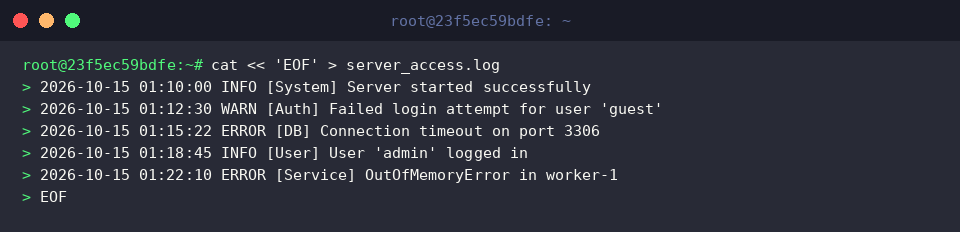
To create the target .bz2 archive while keeping the original uncompressed source intact for side-by-side comparison, execute bzip2 -k server_access.log.

Verify the compressed target’s generation and inspect its storage footprint using ls -lh server_access.log.bz2.

2. Standard Pattern Matching and Case-Insensitive Queries (-i)
Querying an archive for specific keywords without prior extraction is straightforward—run bzgrep "ERROR" server_access.log.bz2.
By default, the utility enforces strict case sensitivity, isolating and displaying only records with an exact capitalized ERROR token.

When troubleshooting scenarios where casing across log components might vary, incorporate the -i flag by running bzgrep -i "error" server_access.log.bz2.
Passing this switch forces the search engine to ignore character casing, aggregating all occurrences of the term across upper, lower, and mixed variants in a single sweep.

3. Displaying Line Numbers (-n), Counting Hits (-c), and Inverting Matches (-v)
Pinpoint the precise location of an incident inside the compressed stream by supplying the -n parameter: bzgrep -n "ERROR" server_access.log.bz2.
Prepending line coordinates to matching output accelerates incident correlation when reviewing extensive log histories.

If your goal is to evaluate occurrence frequency rather than dump raw records to the terminal, leverage the -c argument with bzgrep -c "INFO" server_access.log.bz2.
This returns a concise integer count of all matched lines, delivering immediate quantitative insight into service events directly from the archive.

To isolate anomalies by filtering out routine background chatter, apply an inverted search via the -v flag: bzgrep -v "INFO" server_access.log.bz2.
Suppressing standard informational entries bubbles up warnings, alerts, and critical failures that require prompt administrative intervention.

4. Querying Multiple Archives Simultaneously and Utilizing Regex Patterns
To simulate an environment containing rotated logs across multiple cycles, create a duplicate archive using cp server_access.log.bz2 server_access_backup.log.bz2.

Combine shell wildcards (*.log.bz2) with extended regular expressions (-E) to parse complex criteria across all targets at once: bzgrep -n -E "(ERROR|WARN)" *.log.bz2.
This single pipeline scans every compressed log within the working directory for either ERROR or WARN records.
Because the -n parameter is active across multiple inputs, each hit automatically prefixes the corresponding filename alongside its line number, allowing administrators to rapidly trace faults across rotated backup sets.

Mastering bzgrep eliminates unnecessary decompression cycles and drastically reduces friction during post-mortem audits and log telemetry reviews. Incorporate these flags into your day-to-day Linux administration workflow to minimize disk storage pressure and accelerate investigative triage.