


Overview
Enforcing strict credential rotation schedules and automated account expiration constitutes an essential baseline for hardening Linux environments. Through this hands-on tutorial, we will explore how to manage password aging lifecycles and user lockout parameters utilizing the native chage utility. Following a step-by-step approach on an isolated test profile, you will inspect active aging details, establish periodic renewal intervals, and mandate immediate credential updates upon first authentication.
1. Setting Up a Dedicated Test Account and Auditing Aging Details (chage -l)
To maintain a secure and clean sandbox environment, begin by creating a standalone test account named testuser if one does not already reside on the system.

Assign an initial baseline password to the newly provisioned testuser account leveraging batch input with chpasswd.

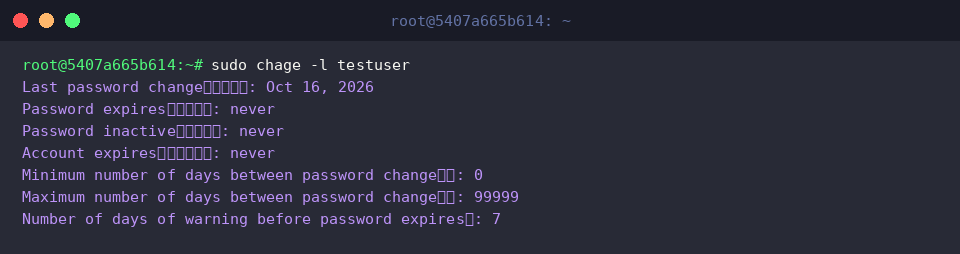
The chage utility serves as the core Linux tool for governing password aging parameters and account validity windows.
Pass the -l flag to query the current expiration lifecycle configuration currently governing testuser.
⚙️ [Key Parameters]
-l : Lists detailed account aging information and current expiration milestones.-m : Defines the minimum interval (in days) required before a user may alter their password again.-M : Designates the maximum validity lifespan (in days) permitted for a single password.-W : Configures the advance warning period (in days) displayed to users prior to password expiration.-I : Sets the post-expiration inactivity grace period (in days) allowed before locking the account.-E : Schedules a specific cutoff date after which the user account becomes permanently disabled.-d : Overwrites the epoch timestamp representing the last date the password was modified.
2. Configuring Password Validity Lifespans and Advance Warnings (-m, -M, -W)
Execute chage to establish a mandatory 7-day cooldown between password modifications (-m 7), enforce a 90-day maximum lifetime (-M 90), and trigger user warning alerts 14 days ahead of expiration (-W 14).
This combination prevents rapid cycling through passwords while guaranteeing systematic quarterly credential rotation.

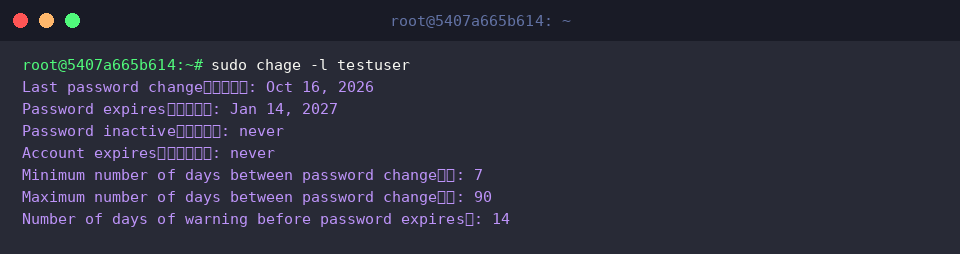
Verify that the updated rotation constraints took effect by inspecting the account settings again via the -l option.
The generated report confirms that the minimum change delay (7), maximum lifespan (90), and advance warning duration (14) have adjusted the projected password expiration target accordingly.
3. Defining Account Expiration Dates and Inactivity Lockout Windows (-E, -I)
Schedule a hard cutoff date of December 31, 2026 (-E 2026-12-31) alongside a 7-day post-expiration inactivity buffer (-I 7) using the chage command.
Establishing these thresholds automates the decommissioning of temporary contractor accounts and systematically locks unmaintained profiles that miss their password rotation deadlines.

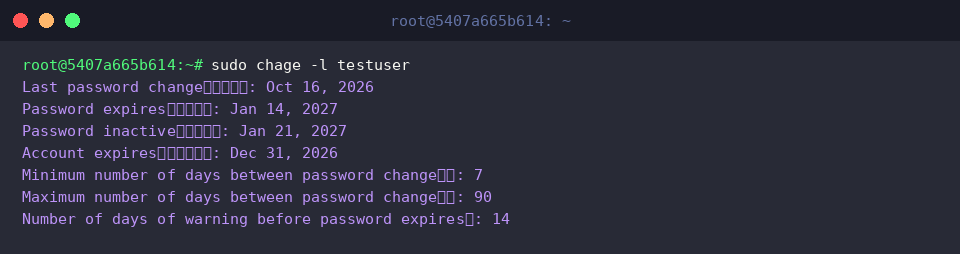
Run chage -l once more to validate the application of these lifecycle controls to testuser.
The resulting console output confirms that both the account decommission timestamp (Account expires : Dec 31, 2026) and the post-expiration lock milestone (Password inactive : Jan 21, 2027) match our exact target schedule.
4. Enforcing Password Reset on Next Login and Lab Teardown (-d 0)
Reset the last modification epoch to zero (-d 0) to instruct the system to demand an immediate password update upon the user’s subsequent session initialization.
This technique eliminates vulnerabilities associated with administrator-assigned default credentials by requiring end users to replace temporary passwords prior to shell access.

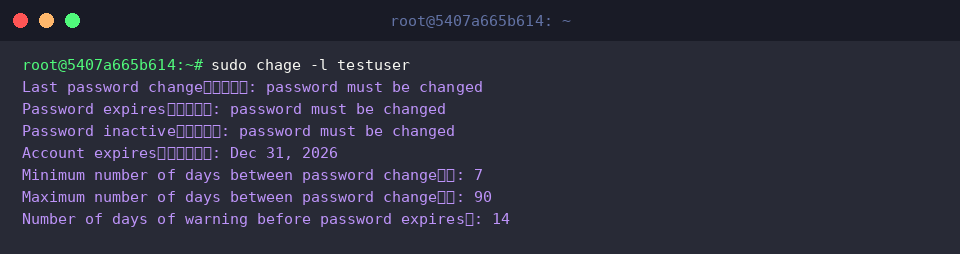
Query the account state again using -l to confirm the enforcement flag.
Notice that both the Last password change date and Password expires field now report password must be changed, confirming that login cannot proceed without a password overhaul.
To restore host cleanliness, purge the ephemeral testuser account alongside its corresponding home directory using userdel -r.

Throughout this walkthrough, we explored how the Linux chage utility delivers granular governance over user lifecycle timelines and password aging rules.
Implementing these automated rotation workflows will substantially reduce exposure to stale credentials and elevate your Linux infrastructure security posture.