


Overview
Encountering scrambled, unreadable characters (mojibake) in configuration files or server logs is a common headache for Linux administrators. Solving this requires pinpointing the underlying character encoding before attempting any repairs. This tutorial walks through setting up the chardetect CLI utility, running charset detection on various test files, exploring piped streams, and understanding how the statistical detection engine pairs with iconv to fix corrupt text.
Installing chardetect and System Setup
Begin by refreshing the APT package indexes and installing python3-chardet, which provides the standalone chardetect binary alongside necessary core utilities.
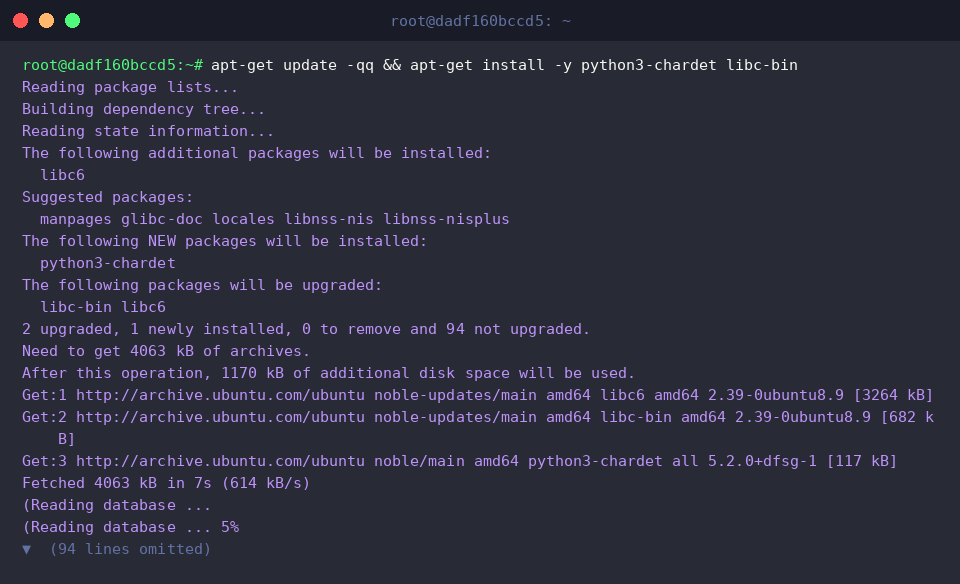
Under the hood, chardetect inspects raw byte sequences from files or incoming data streams, reporting both the identified character set and a statistical confidence score.
Run the --version flag to verify that the binary is available in the shell path.
⚙️ [Key Options]
-l, --line-per-line : Evaluates character encoding on a line-by-line basis rather than scanning the entire payload.--minimal : Suppresses confidence ratings and outputs only the detected encoding name.-h, --help : Displays the command-line usage summary and available flags.--version : Outputs the installed release version and exits immediately.

Generating Encoding Test Files and Running Character Set Detection
To evaluate how chardetect handles different character encodings, first generate a standard UTF-8 text document named utf8_test.txt using echo.

Next, create an alternative legacy encoding sample. Using iconv, transcode the UTF-8 source file into Korean EUC-KR encoding and write the output to euckr_test.txt.

Pass both files as arguments to chardetect to inspect how the utility classifies distinct byte signatures simultaneously.
The utility identifies utf8_test.txt as UTF-8 and euckr_test.txt as EUC-KR, assigning an optimal 99% (0.99) confidence rating to both detections.

Analyzing Standard Input Streams and Batch Processing Multiple Files
Simulate a production log scenario by provisioning a directory named test_logs populated with two distinct files: an ASCII-only system record (sys.log) and a localized error log (error.log).

When working inside automation scripts or parsing network data, piping standard input directly into chardetect is often necessary. Piping the output of cat streams the byte payload straight into the analyzer.
Because no path was specified on the command line, the utility labels the source as <stdin> and successfully identifies the stream as UTF-8 with 99% confidence.

Shell globbing allows scanning an entire directory tree in a single invocation. Execute chardetect with a wildcard pattern across test_logs/*.log.
The utility parses every matching file in sequence: error.log is identified as UTF-8, while the plain English log sys.log is accurately classified as pure ASCII.

Understanding chardetect Internals and Converting Charsets with iconv
Because chardetect is powered by Python’s chardet library, you can invoke the detection algorithm directly from an inline Python one-liner to inspect the raw evaluation dictionary.
Reading euckr_test.txt in binary mode (rb) returns the full diagnostic structure: the detected encoding (EUC-KR), mathematical confidence (0.99), and the predicted language (Korean).

Once chardetect reveals the source encoding, utilize iconv to migrate legacy files to modern standard UTF-8.
Specify the source charset using -f EUC-KR, set the target format via -t UTF-8, and direct the output to converted_utf8.txt using the -o switch to ensure a clean, corruption-free conversion.

Finally, validate the newly generated file using chardetect to confirm that the transformation succeeded.
The output verifies that converted_utf8.txt is now recognized as UTF-8 with full 99% confidence.

Mastering chardetect provides a rapid, dependable method for diagnosing character set mismatches across Linux environments. Incorporating it alongside iconv into your administrative toolkit will help you resolve broken encodings and streamline text processing pipelines.