


Overview
Fine-tuning thread scheduling policies and configuring deterministic real-time priorities give system engineers precise control over latency-critical workloads in Linux. At the heart of this capability sits chrt, a lightweight utility provided by the util-linux suite designed to query and manipulate POSIX real-time scheduling attributes (specifically FIFO and Round-Robin disciplines). This hands-on tutorial guides you through verifying necessary tools on Ubuntu, inspecting kernel-supported priority boundaries, dynamically elevating running threads, and monitoring execution classes in real time.
Inspecting Kernel Scheduling Policies and Priority Boundaries
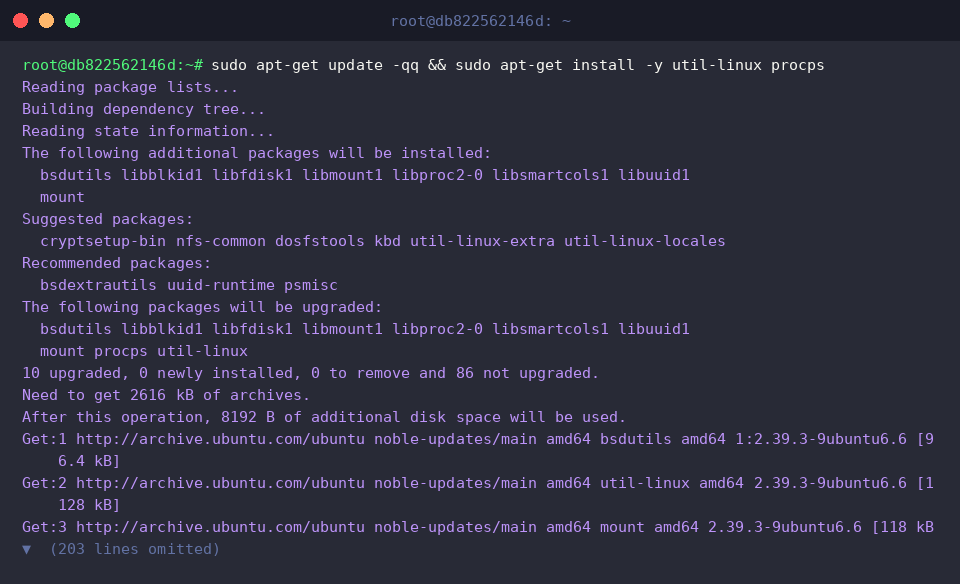
Before manipulating process attributes, ensure that the host environment has the current toolchains from util-linux and procps installed.
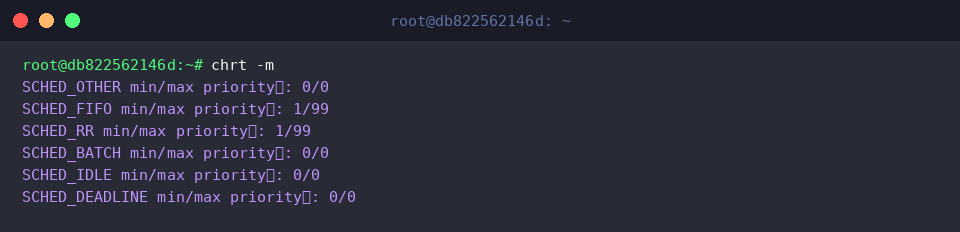
The chrt utility acts as the primary user-space interface for querying and setting real-time scheduling parameters. Supplying the -m flag instructs the kernel to report all supported scheduling disciplines alongside their permitted minimum and maximum priority values.
⚙️ [Key Options Reference]
-m : Displays the full matrix of kernel-supported scheduling classes and their respective minimum/maximum priority levels.-p : Targets an active process ID (PID) to either inspect or modify its scheduling profile.-f : Selects the static First-In, First-Out real-time discipline (SCHED_FIFO).-r : Selects the pre-emptive Round-Robin real-time discipline (SCHED_RR).-o : Restores standard completely fair/time-sharing scheduling (SCHED_OTHER).-b : Assigns the batch scheduling policy (SCHED_BATCH) for non-interactive background throughput.-i : Assigns the idle-level scheduling policy (SCHED_IDLE) for non-urgent maintenance routines.-d : Enforces deadline-driven task scheduling (SCHED_DEADLINE) for hard temporal constraints.
Evaluating Default Scheduling Policies on Active Tasks
To establish a baseline for scheduling experiments, launch an idle background task utilizing sleep 600 &.

Capture the process identifier of this newly launched background job by assigning $! to a dedicated shell variable via TARGET_PID=$!.

Query the task’s initial scheduling profile with chrt -p. Linux spawns standard processes under the default time-sharing algorithm (SCHED_OTHER) with an assigned real-time priority score of 0.

Cross-examine this state through ps by leveraging custom format flags (-o) to print the scheduling class (CLS), real-time priority (RTPRIO), and dynamic kernel priority (PRI). The output flags the process as time-sharing (TS), leaves the real-time priority blank (-), and shows a default dynamic priority index of 19.

Upgrading Tasks to Real-Time Policies: SCHED_FIFO & SCHED_RR
Execute sudo chrt -f -p 50 $TARGET_PID to transition the background task into the SCHED_FIFO real-time class with a static priority assignment of 50. Modifying real-time attributes alters CPU time slice distribution across the system, making administrative privileges (sudo) mandatory.

Validate the transition by executing chrt -p against the targeted PID. The output confirms that the scheduler now treats the process under the SCHED_FIFO algorithm at priority 50.

Next, adjust the scheduling strategy to Round-Robin by issuing sudo chrt -r -p 30 $TARGET_PID. Under SCHED_RR, runnable threads of identical priority share CPU time evenly across fixed quantum slices rather than running indefinitely until voluntary yield or preemption.

Recheck kernel telemetry via ps to review how these attributes manifest in system tables. The class identifier transitions to RR, the real-time priority column reflects 30, and the internal kernel priority (PRI) shifts accordingly to 70.

Spawning Real-Time Processes Directly and Cleaning Up Resources
Beyond adjusting running threads, chrt can initialize binaries directly under a specified real-time discipline. Run sudo chrt -r 25 sleep 300 & to immediately spawn a background sleep job governed by SCHED_RR at priority 25.

Audit all active instances of the command by running ps -eo pid,cls,rtprio,comm | grep '[s]leep'. Both instances clearly show their assigned Round-Robin (RR) classification alongside their corresponding real-time priority levels (30 and 25).

Conclude the session by terminating the experimental background tasks and freeing allocated slots with kill -9 $TARGET_PID && pkill -f 'sleep 300'. This resets the environment to its original state.

Mastering chrt equips administrators and developers with the exact tools needed to ensure deterministic responsiveness for critical system threads and time-sensitive Linux services.