


Technical Overview
Modern Linux administration relies heavily on orchestrating data streams across processes, and xargs serves as the quintessential bridge converting standard input (stdin) into structured command-line parameters. In this hands-on guide, we explore how to elevate your pipeline workflows using xargs. You will learn how to handle problematic whitespace with find, perform customized file mutations with replacement markers, and scale compute workloads effortlessly using concurrent subprocess pooling.
Understanding Core Mechanics: Transforming Stdin into Arguments
Before experimenting with arguments, prepare an isolated playground in /tmp by running mkdir -p /tmp/xargs_demo && cd /tmp/xargs_demo.

By default, xargs consumes delimited tokens received via pipe (|), splits them by whitespace, and appends them to the target command. Supplying the -n 2 switch constrains the argument payload to two tokens per invocation, triggering iterative command execution until the input buffer is exhausted.
⚙️ [Essential Command Options]
-n : Dictates the maximum threshold of positional arguments dispatched per sub-command run.-d : Specifies an explicit custom delimiter for segmenting incoming data streams instead of default blanks.-0 : Expects null bytes (\0) as item boundaries, safeguarding against errors caused by embedded spaces or newlines.-I : Designates a template replacement string to interpolate tokens anywhere along the target command invocation.-P : Enables parallel concurrency by spawning up to a designated ceiling of worker processes simultaneously.-p : Enables interactive safeguard prompts, asking for operator confirmation prior to firing each generated task.-t : Traces execution by printing the fully expanded command line to stderr immediately before execution.

Handling Whitespace Safely: Pairing find with xargs -0
To simulate potential edge cases with problematic paths, create an auxiliary folder by executing mkdir -p /tmp/xargs_demo/files.

Populate the test directory with files containing embedded whitespace using touch "/tmp/xargs_demo/files/sample document.txt" "/tmp/xargs_demo/files/backup data.txt".

Standard utilities often choke when paths contain spaces because shell delimiters fragment the path strings. Coupling find’s -print0 parameter with xargs -0 resolves this friction by utilizing the null terminator (\0) as the absolute record separator.
Consequently, ls -lh parses each filename as an intact entity without accidental fragmentation, successfully listing comprehensive file attributes.

Orchestrating Dynamic Backups with Replacement Placeholders (-I)
To establish a baseline for our automated archival workflow, initialize dummy configuration files via touch /tmp/xargs_demo/app.conf /tmp/xargs_demo/db.conf.

Next, produce an itemized manifest of active services ready for archival by executing echo -e "app\ndb" > /tmp/xargs_demo/service_list.txt.

By designating {} as a variable token using the -I flag, xargs injects each incoming service identifier directly into dynamic file paths.
The shell evaluates the pipe line-by-line, triggering independent cp instances that duplicate each base configuration into its corresponding .bak counterpart.

Verify the snapshot outputs across your workspace with ls -la /tmp/xargs_demo/*.bak.
The directory listing confirms the presence of app.conf.bak and db.conf.bak, proving that our parameter substitution strategy executed cleanly.

Boosting Throughput: Parallel Processing (-P) and Command Tracing (-t)
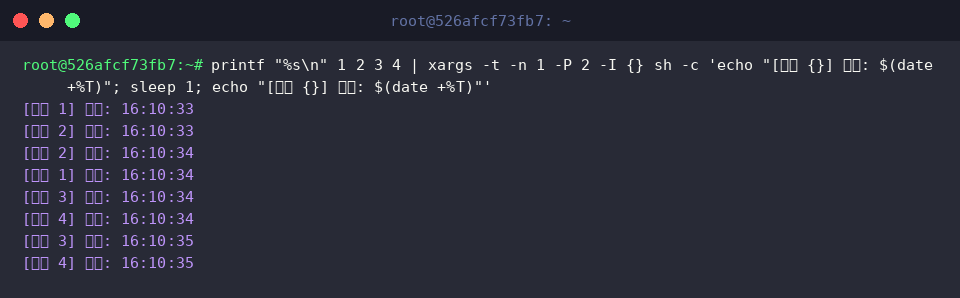
Combining the diagnostic -t switch with -P 2 unlocks simultaneous multi-core execution, capping the concurrent process ceiling to two worker jobs at any given instant.
Observing the runtime terminal log reveals how jobs 1 and 2 start and conclude concurrently, immediately yielding execution slots to jobs 3 and 4 in the pipeline queue.
Mastering xargs transforms sequential shell routines into high-performance, robust pipelines tailored for demanding Linux sysadmin operations.
Incorporate these flags into your maintenance automation scripts to streamline high-volume file processing and unlock seamless concurrency.